
General Settings
On the Settings page, you can adjust the app’s behavior during content generation.
These are general settings. For specific product pages, you can configure settings individually on the product/collection/blog generation page.
Open Settings page and specify the following:
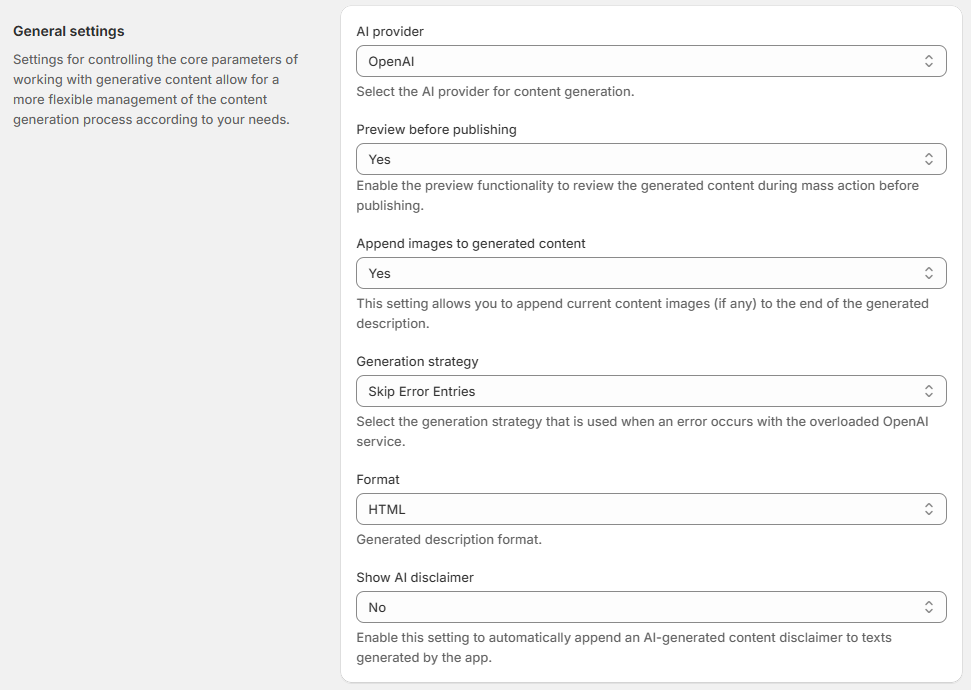
Preview before publishing - enable the preview functionality to review the generated content during mass action before publishing.
Append images to generated content - set Yes to add current content images (if any) to the end of the generated description. The option also works for description refinement - in this case, images remain in their original positions.
Generation strategy - select the generation strategy that is used when an error occurs with the overloaded OpenAI service.
AI provider - The selected provider determines which AI model is used for content generation. All generation features and automation settings work the same way for both providers.
Available providers:
OpenAI (default)
Gemini
Format - this parameter allows you to select the desired format for the generated content:
HTML - the content generator will create text that adheres to the HTML markup language. This enables the creation of structured content, including headings, paragraphs, lists, links, images, and other web page elements.
Plain text - the content generator will produce unformatted text without any styling or markup. This simple text format does not include styles, fonts, or external elements.
Show AI disclaimer - Select Yes to append a disclosure to generated content (Default: No). Use an additional required Disclaimer text to enter the disclaimer message that should be added to AI-generated content.
The disclaimer is added as a new line to the end of Product Descriptions, Collection Descriptions, and Blog Content.
Translations are not automated for disclaimer. If you generate content in Spanish, your disclaimer text must also be written in Spanish.
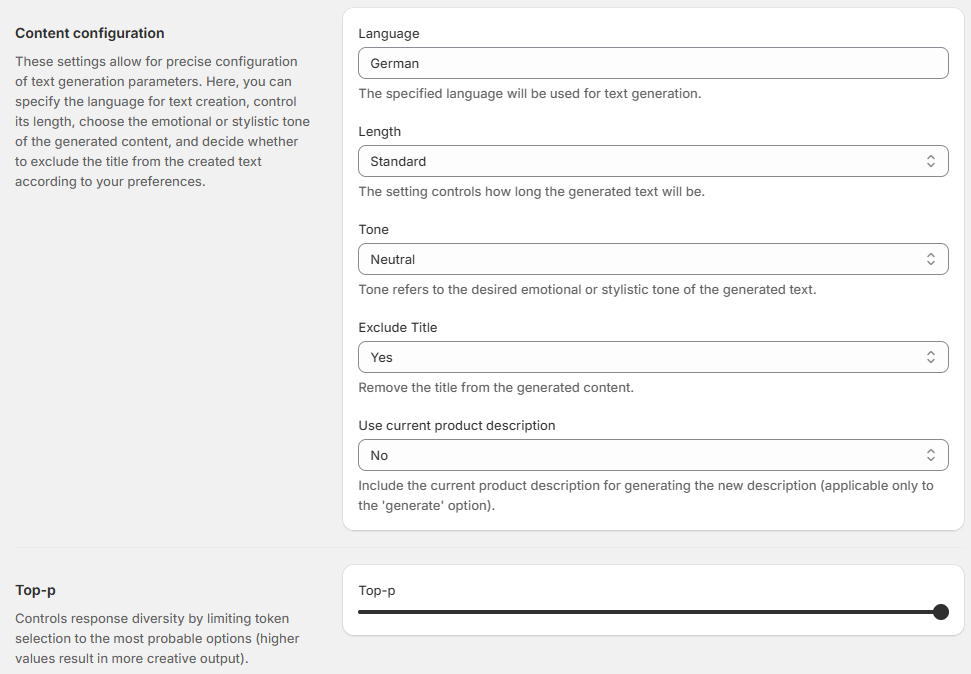
Language - specify the language used for text generation.
Length - choose the size of the generated text. It determines the number of tokens in the output generated by the model:
Short - choosing the short length option limits the generated text to a maximum of 300 tokens.
Standard - the standard length option allows the generated text to be up to a maximum of 600 tokens.
Long - selecting the long length option allows for more extensive and detailed responses, with a maximum of 800 tokens.
Tone - tone refers to the desired emotional or stylistic tone of the generated text.
Exclude Title - remove the title from the generated content. This ensures that the product name doesn't duplicate in both the title and the content.
Use Current Product Description - this setting allows you to include the existing product description when generating a new one using the 'Generate' option. By enabling this feature, the AI will consider the current description as context, potentially leading to more relevant and consistent new descriptions. This is useful when you want to refine or expand upon an existing description rather than starting from scratch.
Top-p (Predictability) - Use the slider to control the randomness of the output.
Lower Top-P: Results in more predictable, focused, and stable text.
Higher Top-P: Results in more varied, creative, and diverse text.
Defaults: OpenAI (1.0), Gemini (0.95).
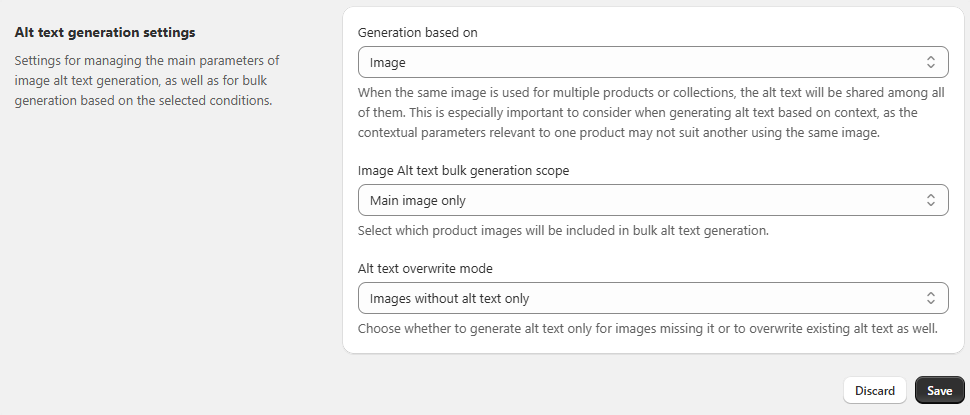
Alt Text Generation Settings - these settings control how image alt texts are created and when they are updated.
Generation based on - choose what the system should use for generating alt texts:
Image (default) – Generates based only on the image content.
Context – Generates using the product or collection title, description, and (if enabled) variants or keywords.
If the same image is used in multiple products or collections, the generated alt text will be shared between them. Keep this in mind when using the Context option, as it may not always fit all cases.
Image Alt text bulk generation scope - Define which images are included when running bulk generation:
Main image only (default) – Generates alt text only for the main image.
All images – Generates alt text for all product or collection images attached.
Alt Text Overwrite Mode - Set whether existing alt texts should be replaced during bulk generation:
Images without alt text only (default) – Generates alt text only where it’s missing.
All images (overwrite existing) – Replaces any existing alt text with newly generated text.
These settings are the basis for the content generation, both for individual content and multiple content through the 'Generate description'/'Generate SEO' mass action. However, it is important to note that these settings can be individually modified for specific object if custom adjustments are required.
Save changes. After configuring the settings, switch to the necessary object grid, where you can generate content individually or in bulk.