
SEO content audit
The SEO Content Audit is an intelligent system that analyzes your store’s missing data and checks coverage by displaying a score.
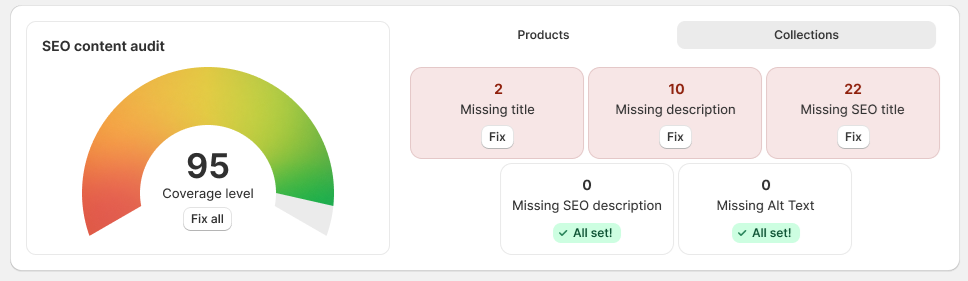
Open the WritePilot Home page and scroll to the SEO Content Audit dashboard.
Check the Overall Score on the left. This is a high-level indicator showing how complete and optimized your product and collection content is.
On the right, you’ll find more detailed information on each object, organized into two tabs:
Products
Collections
Each tab contains tiles highlighting missing or incomplete content, such as:
Missing description
Missing SEO title
Missing SEO description
Missing keywords (Products only)
Missing Alt Text
The same corresponding tiles can be viewed on
the Content generation page with the Fix action.
For each tile, click the Fix button to automatically generate the missing content in bulk for all relevant items.
If no action is required for a specific item, the tile will display the “All set” status, indicating no missing content.
To generate all missing content at once:
Open the SEO Content Audit dashboard, or go to the Content generation page.
Click Fix all.
The app automatically generates all missing content types identified by the audit, such as descriptions, SEO titles, SEO descriptions, keywords, and Alt Text where applicable.
Fix all works across all content types that currently have missing values. Generated content is automatically applied to the corresponding products or collections.