
Blog content generation
With WritePilot, you can create blog posts on any topic and generate a matching thumbnail.
Set up your blog before generating content
Before generating blog content with WritePilot, first, you need to create a blog page where all your posts will be stored, along with a blank blog post, which will contain a topic for the post that will include a topic for the AI to generate content around.
Create a blog page
If you already have a blog page created in Shopify Admin, you can skip this step.
From Shopify Admin, go Content > Blog posts.
Click the Manage blog button.
Click Add blog.
Fill in details about your blog page.
Save changes.
Create a blank blog post
This step is required for each new blog post.
In Shopify Admin, go Content > Blog posts.
Click Add blog post.
Add the post title.
(Optionally) Specify an excerpt (post summary), SEO details, visibility settings, a featured image, and other options.
Save changes.
Generate blog post and featured image
Open WritePilot and go to the Content Generation section of the sidebar.
Select the Blogs tab to generate content for blogs..
Select a blog page you already created earlier (from Step 1).
Open the blank blog post you created (from Step 2) or create a new post directly from here.
(Optionally) On the right side of the page, configure individual settings for the blog post:
Specify title
Add additional information
Set length, tone, language, and format.
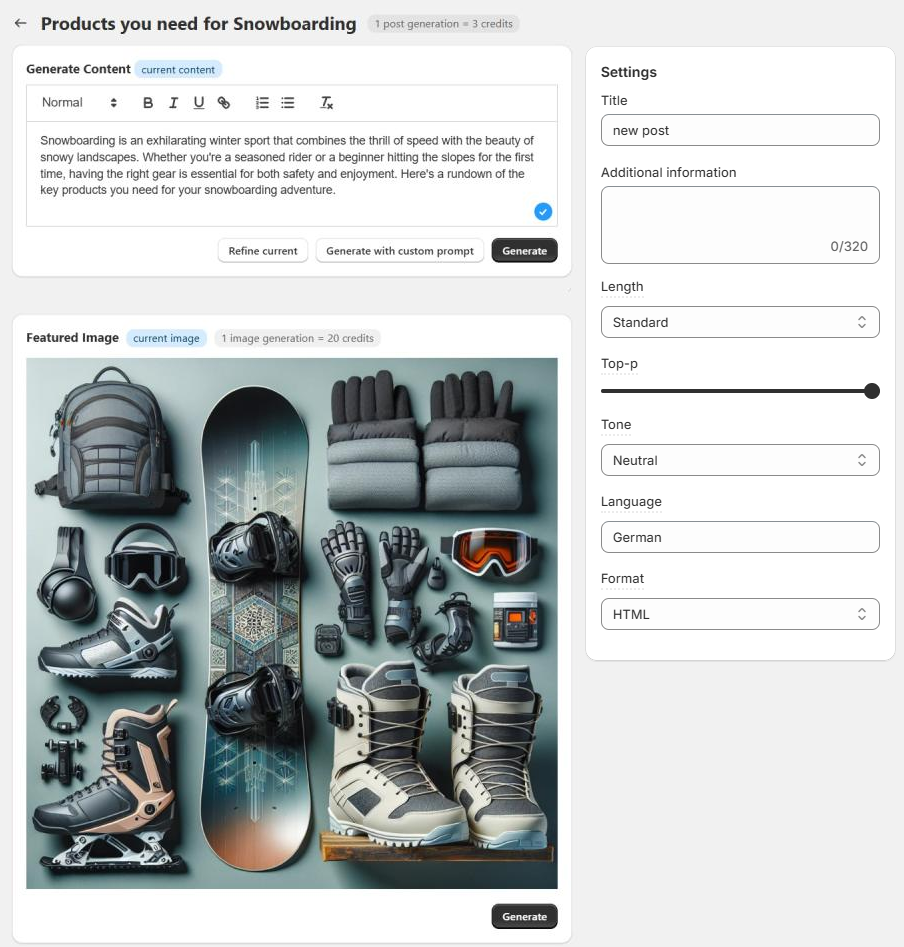
For generating blog content, choose one of the following options:
Generate - create content with default prompt;
Generate descriptions with custom prompt - create content using your specific instructions to AI. Learn more.
Refine - (available for existing content) improves the grammar, syntax, and wording of existing content.
(Optionally) Generate featured images for the post.
Save changes.
You can edit or Regenerate content any time.

Here’s how credit usage is calculated for generation:
1 post generation = 3 credits
1 refine = 6 credits
1 image generation = 20 credits.